TL/DR:
We've redesigned the way you build seating charts, manage venues, enact box office holds, and apply per-seat configurations.
- New "Venue Management" section on the main nav to create and manage venues, seating charts, and holds at the org level instead of only within the production creation flow
- Redesigned seating chart authoring experience that's faster, and easier to use; support for new seating configurations such as tables, booths, and unique shapes; ability to bulk edit seats and sections, during chart creation or per production or performance
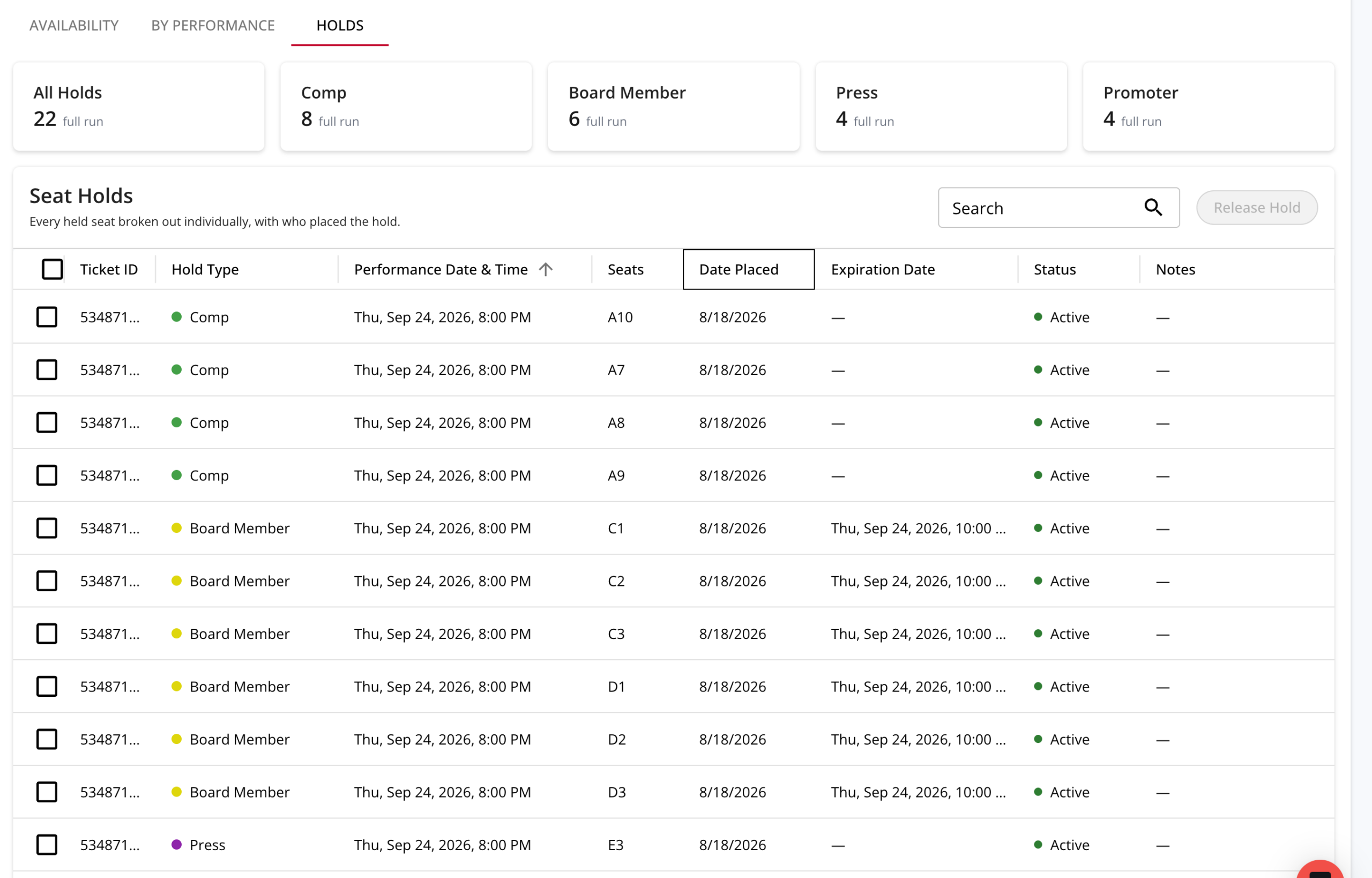
- Define custom seat hold types such as press, VIP, alumni, or major donors; apply holds to seats globally, per production, or per event; view a complete list of all holds per production or performance; pre-set times for holds to auto-expire and release tickets back to general sale
- Make changes to seating charts even after you've gone on sale, with protections to prevent changes to already-sold tickets
Redesigned Seating Charts that Delight Patrons and Box Office Teams
Your venues and performance spaces are unique, and accurate seating charts are critical in helping ticket buyers to decide which seats to buy - or whether or not to buy at all. Internally, seating charts are also the backbone of your box office, where you decide which seats are for sale, who can buy them, and at what prices - sometimes on a per event basis.
That’s why we’ve rebuilt seating charts from the ground up, making it easier than ever to create and manage charts, manage holds and availability, and even make changes after an event goes on sale. Whether you're running a 900-seat proscenium house, or a comedy club with a bar in the back, or a commercial music venue comprised of tables, booths, and standing room, you can now build a chart that actually looks like your room.
Here's what's new.
Dedicated Venue Management
Now there's a dedicated Venue Management section in the main nav, with access to three dashboards:
- Venues — add and manage every venue you use, in one place
- Seating Charts — create, duplicate, and manage seating charts for every venue and performance, independent of any single production
- Hold Types — define your own categories of seat holds, so your box office can flag house seats, board seats, press comps, or major donor seats with a click
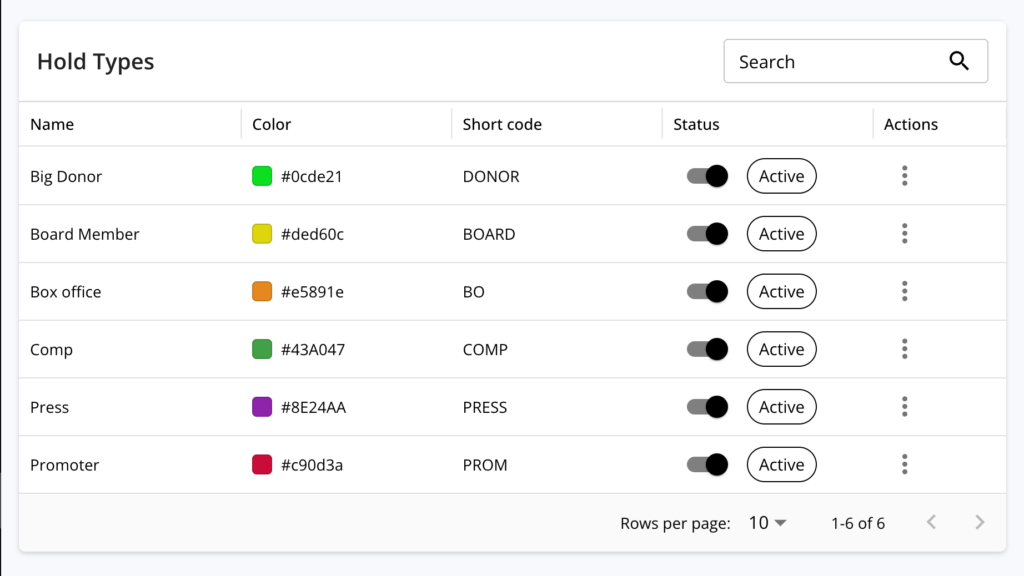
Dedicated venue management means that seating charts can be created independent of individual productions, making them easier to build, manage, and apply to your events.
Build Charts that Match Your Space
The new seating chart builder is a visual drag-and-drop workspace that lets you intuitively build complex layouts in minutes. From traditional theater setups to commercial venues with multiple zones and complex seating configurations, it’s easy to build a chart that accurately reflects your space.
If you need help, we’ve got you covered - OTS will help build your first chart for you.
New Layout Options
In addition to basic aisles and rows, now you can build seating charts with a variety of new and updated seating configurations.
- Curved rows - Add single rows or blocks of rows with one click, and apply any angle of curve.
- Tables — Build square, rectangle, or circle tables, specify the number of seats, and rotate each table to face the stage (or wherever you need).
- Booths - Create booths in any shape, and position them anywhere in your chart.
- On-stage seating - Add any type of seat or seating configuration to your stage for on-stage seats.
- Per-seat controls - Mark seats as ADA accessible, ADA companion, or permanently blocked (for things like sound and light board build over a seat block).
- Custom seat distributions - Have a table facing the stage? Position all seats on only one side of the table so that everyone has a good view.
- General admission - Create general admission zones of any shape and size, with unique capacity limits.
- Additional objects - Add non-seat objects, such as columns or AV equipment, to your seating chart using custom shapes and text labels.
- Visual icons - Use common icons to indicate things like exits, bathrooms, information kiosks, and fire extinguishers.
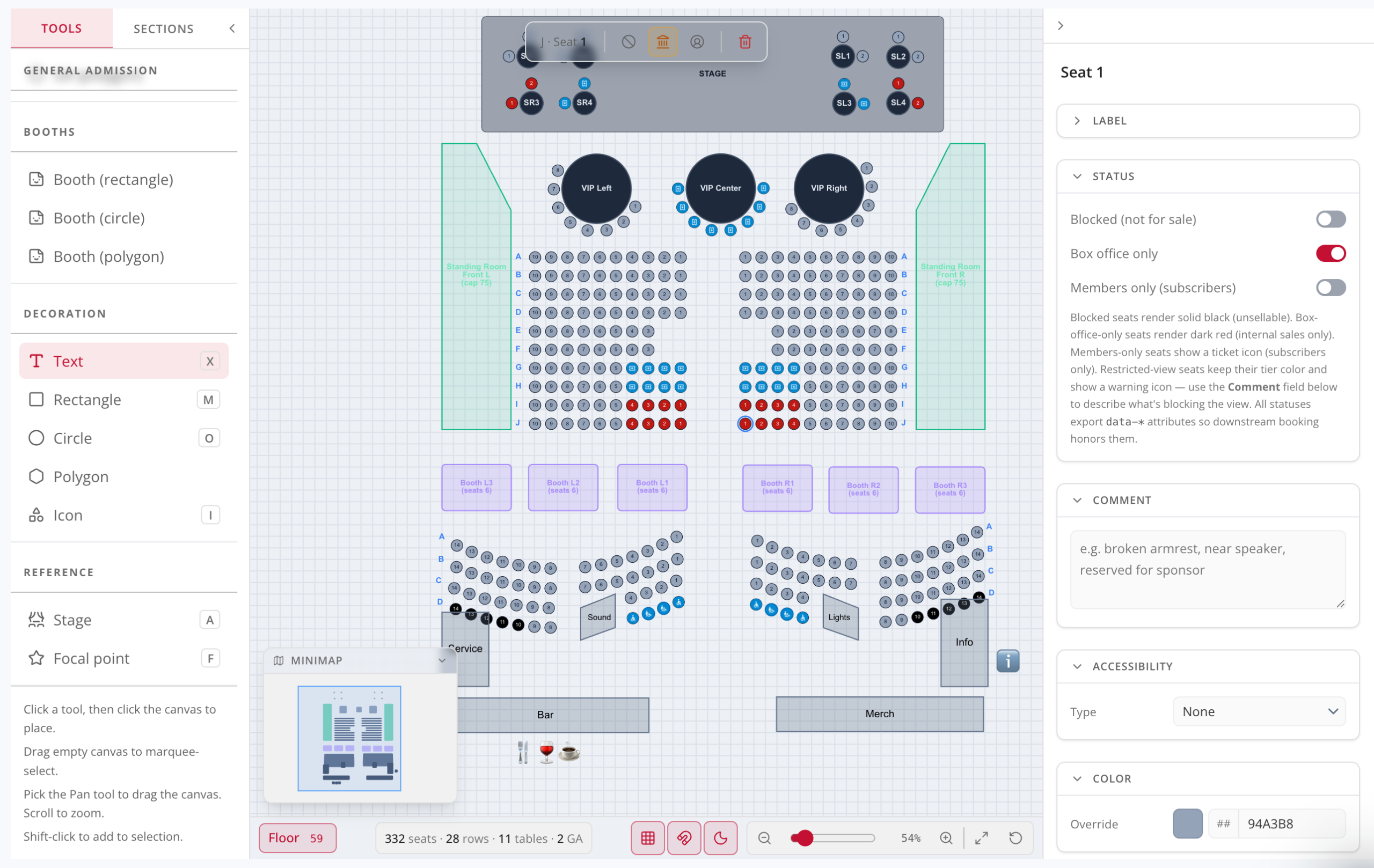
You can also specify different internal and patron-facing names for tables and booths (think “table 37” vs. “VIP table 1”), as well as configure custom seat distributions and seat name conventions. Box office teams can also apply custom colors and patron-facing labels for any object or seat, offering virtually limitless customization options.
Speedy Authoring
In addition to adding new seating configuration options, we’ve also added several authoring tools that make it easier than ever to build high-quality charts in minutes.
- Collapse the main nav to work on a full screen canvas
- Bulk-create and bulk-edit rows, blocks, holds, and visual stylings with a single click
- Duplicate, resize, rotate, and mirror objects, meaning you only need to build repeating configurations once
- Layer overlapping objects with simple send-to-back and bring-to-front controls
- Define global sections (like orchestra/balcony or floor levels) once, and have them carry through every future variation of the chart
- Save any chart as a template, so your next venue or variation starts from a finished layout instead of a blank page
Per-seat Controls
Once your seating chart is built, it’s easy for box office teams to apply custom controls to individual seats, even if they’re part of a larger seating section, row, booth, table, or other configuration. OTS makes it easy to define custom configurations for every seat - individually, or in bulk using multi-select.
OTS also makes it easy to specify global seat settings that are automatically inherited (things like ADA accessible seats or permanent sound or light board setups), or to configure seats on a per-production or per-event basis for things such as holds, blocks, and members-only availability.
- Holds - Mark seats as on hold, using a custom hold type that you define
- Blocks - Prevent seats from being sold, even by your box office team
- Box office-only seats - Specify certain seats that can only be sold directly via your box office (not available for online sales)
- Members-only seats - Earmark seats that can are only available to your members
- Patron notes - Add notes that are visible to the patron during seat selection to communicate important information, such as obstructed views
- Box office notes - Add internal notes to assist box office teams
Customize Settings for Every Event
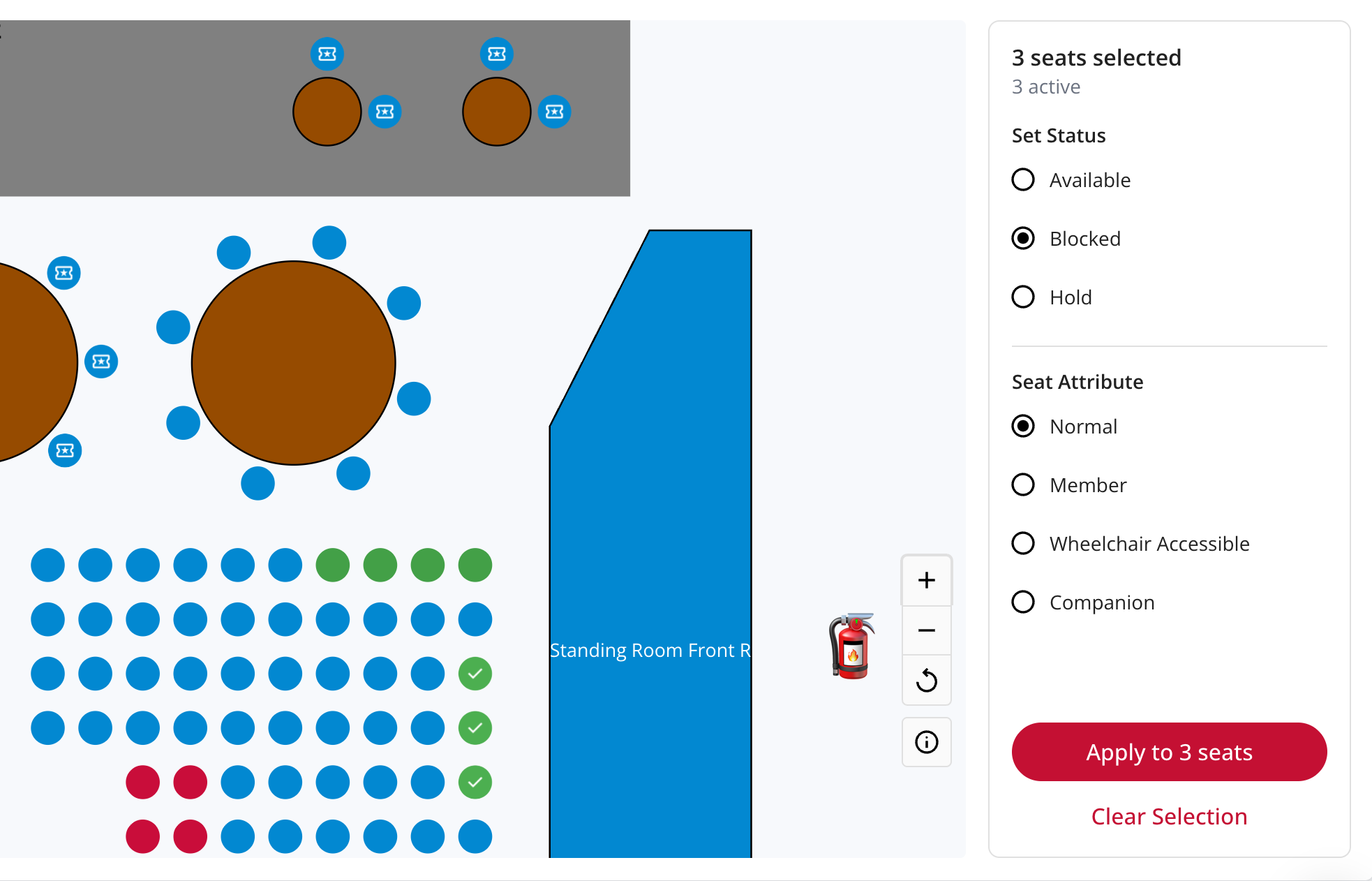
Once you’ve built your seating chart and applied it to an upcoming production, OTS makes it easy to manage availability, holds, and custom seating configurations in a new visual editor - just navigate to the “Seating” tab for a production.
- Visual interface — Apply seat blocks and holds for a whole run, or for a single performance, right on your seating chart
- Holds list - See a complete list of every hold across a production in single list that is filterable by performance, ticket type, and hold type
- Hold expirations - Set dates and times to automatically release unused held tickets, after which they become available for general sale
- Bulk controls - Select one seat or multiple to bulk-edit blocks or sections to apply, adjust, or release holds in one click, instead of one seat at a time
Make Changes, Even After You’ve Gone On Sale
Need to fix a row label? Add an overflow section? Adjust the spacing of an aisle? Sometimes things change after you’ve gone on sale, and your seating chart needs to change with it. Now it’s possible to alter seating charts for on-sale events, with built-in protections for patrons who have already bought tickets.
- Add seats - Add additional seats, seating sections, and seat blocks.
- Adjust layouts - Make changes to labels, object placements, colors, and the visual layout.
- Change summaries - See a summary of performances and seats that will be affected by any changes before you apply them.
- Protect patrons - Prevent accidental changes to already-sold tickets, ensuring a seamless experience for patrons and box office teams.
Get Started
Our new seating chart builder and box office controls are available now for all OTS customers - simply navigate to the new “Venue Management” section of your nav, or to a live production, to get started.
If you aren’t an OTS customer yet and are interested in learning more about how our ticketing, marketing, and revenue engine can help your organization to engage audiences and sell more tickets, you can book a demo to learn more.